
Student Instructions
To reset your password, enter in either:
All passwords must adhere to the following criteria:
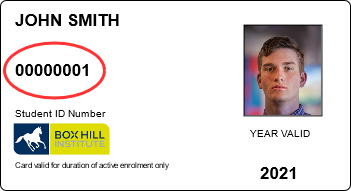
- Your student ID as seen on your Student ID Card
- Your personal email address registered with Box Hill Institute and CAE
All passwords must adhere to the following criteria:
- Be at least 10 characters
- Have not been used as any of the previous 10 passwords
- Must not contain your account name or any part of your name
- Must be changed every 90 days
- Must meet the following 3 conditions:
- Upper case characters (A-Z)
- Lower case characters (a-z)
- Numerals (0-9)
Staff Instructions
To reset your password, enter your staff username followed by "@boxhill.edu.au".
If you have a valid personal email address registered with HR, you will receive reset details to your personal email inbox in the next few minutes
All passwords must adhere to the following criteria:
Following a password reset you will need to update your password in the following locations:
If you have a valid personal email address registered with HR, you will receive reset details to your personal email inbox in the next few minutes
All passwords must adhere to the following criteria:
- Be at least 10 characters
- Have not been used as any of the previous 10 passwords
- Must not contain your account name or any part of your name
- Must be changed every 90 days
- Must meet the following 3 conditions:
- Upper case characters (A-Z)
- Lower case characters (a-z)
- Numerals (0-9)
Following a password reset you will need to update your password in the following locations:
- BHI Wireless connections
- Teams (PC and mobile)
- Outlook (PC and mobile)
- VPN connections
- Other Institute laptops, tablets, desktops
Next Steps
Follow the steps in the request email to finish the password reset process.
Not receiving an email? Follow the troubleshooting steps below
 Troubleshooting
I have not received the email after 10 minutes
- Check your junk email or promotions folders.
- Try resetting a second time.
If you still have not received an email after 10 minutes you may not have a registered email address with Box Hill Institute, or your details may be incorrect
- Your details must be updated with the Student Administration office. Please visit them in person or contact your teacher to understand how to update this with Student Administration.
Please note that course fees must be paid before system access can be provided. - Email: studentadmin@boxhill.edu.au
Phone: 03 - 9286 - 9555
Office hours: |
| (These may reduce during holiday weeks breaks, and extend during peak enrolment periods) |
| Student Administration – Elgar Campus |
| Building 4, Ground Floor |
| 8.00am – 5.00pm Monday Friday |
| 8.00am – 7.00pm last Tuesday of each month (school holidays excepted) |
| Customer Service CAE – City Campus |
| Building B, Level 2 |
| 8.30am – 6.00pm Monday Thursday |
| 8.30am – 5.00pm Friday |
| 9.30am – 12.30pm Saturday |
| Lilydale Lakeside |
| Building LB, Level 2 |
| 8.00am – 5.30pm Monday Thursday |
| 8.00am – 5.00pm Friday |
If you still have not received an email after 10 minutes, please contact payroll to update your private email address, or your manager.